Envelope Budgeting: How to Use the Method With Cash or an App
A practical guide to envelope budgeting, with a worked example, digital options, common mistakes, and an honest Luna adaptation.
Chris Raroque
About 10 min read
Published

The envelope method begins with a physical constraint: when the restaurant envelope is empty, there is no restaurant money left. A digital version keeps the labels and limits, but replaces paper cash with category balances.
The short answer
Envelope budgeting means dividing money among named spending purposes, then checking the relevant envelope before you spend. It is most useful for flexible categories that tend to drift—groceries, dining out, entertainment, shopping—not necessarily every automatic bill.
You can use real cash, a spreadsheet, or an app. The best version is the one that makes the remaining amount clear at the moment of a decision. If an envelope runs out, you stop spending in that category or consciously move money from another envelope. You do not pretend both plans can still happen.
Disclosure: I built Luna, a manual budgeting app. Luna’s categories can be used as envelope-like limits, but Luna’s public guide does not describe native envelopes, envelope filling, hard stops, or formal rollover rules. I will label the Luna approach as an adaptation and include purpose-built alternatives.
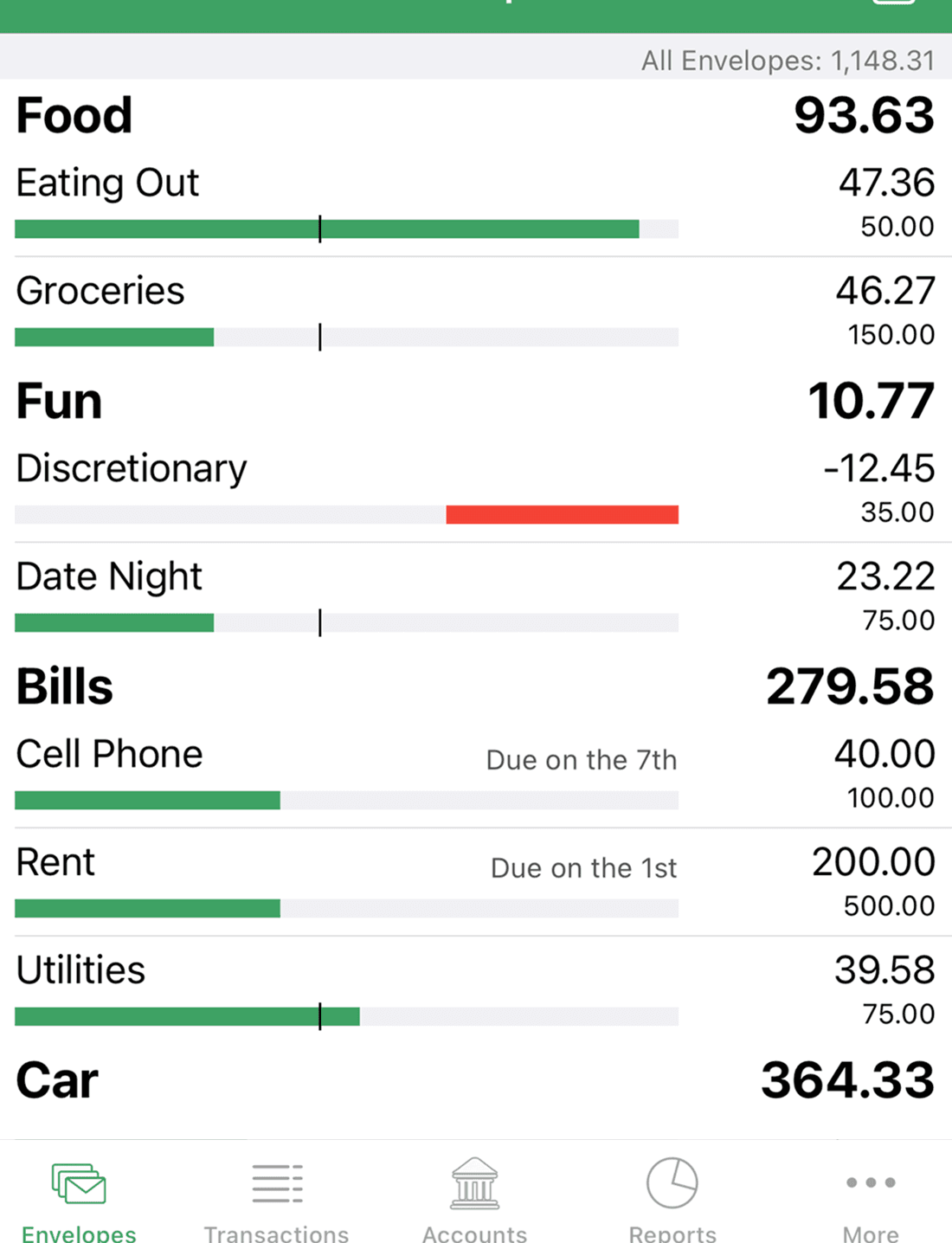
Vendor-authored Goodbudget App Store marketing image, retrieved August 23, 2026. It shows visible envelope balances only; it does not prove pricing, bank sync, sharing, ease of use, or outcomes.
How the envelope method works
The cash version is literal:
Decide how much money a category gets.
Put that amount in a labeled envelope.
Spend from that envelope only for its stated purpose.
Stop or reallocate when it is empty.
Ramsey’s envelope-system explanation recommends using envelopes for categories where overspending is common rather than bills typically paid automatically. That focus is useful even if you do not follow the rest of Ramsey’s budgeting system.
The digital version represents the same constraint with numbers. If Groceries begins at $520 and you record $82 at the supermarket, the envelope has $438 left. The dollars may still sit together in one checking account. The budget gives them separate jobs.
Envelope budgeting versus category tracking
Many apps show category spending. That alone does not create an envelope practice.
A spending report says, “You spent $310 on restaurants last month.” An envelope says, “You assigned $240 to restaurants, and $38 remains before tonight’s decision.” One is descriptive; the other is meant to guide what happens next.
The behavior makes the method:
Assign money before spending.
Treat the remaining balance as the current constraint.
Record or import transactions reliably.
Make transfers between envelopes explicit.
An app may implement this natively, or you may approximate it with ordinary budget categories. A native system usually makes the pool of available money, envelope funding, transfers, and rollover behavior clearer.
Envelope budgeting versus zero-based budgeting
The two methods often appear together, but they are not synonyms.
Question | Envelope budgeting | Zero-based budgeting |
|---|---|---|
Main purpose | Control spending by category | Give all available or planned money a job |
Scope | Can cover a few problem categories | Usually covers the entire plan |
Must every dollar be assigned? | Not necessarily | Yes; unassigned amount reaches zero |
Can money remain for future months? | Yes, depending on the rules you choose | Yes; future bills and savings are valid jobs |
What happens when a category is empty? | Stop spending or move money explicitly | Reassign from another job or change the plan |
You can use restaurant and grocery envelopes while leaving the rest of your money outside the system. That is envelope budgeting, but not a complete zero-based budget. You can also give every dollar a job in a spreadsheet without maintaining envelope-style category balances.
If you want the whole-plan method, start with the zero-based budgeting guide.
A worked digital-envelope example
Suppose you want tighter control over four flexible categories each month:
Envelope | Starting amount |
|---|---|
Groceries | $520 |
Dining out | $240 |
Gas and transit | $180 |
Fun | $120 |
Total | $1,060 |
After the first ten days, you record:
Envelope | Spent | Remaining |
|---|---|---|
Groceries | $168 | $352 |
Dining out | $112 | $128 |
Gas and transit | $54 | $126 |
Fun | $75 | $45 |
The numbers are not a judgment. They are a choice map.
Now friends invite you to a concert that costs $70. The Fun envelope has $45. You have three clean options:
Skip the concert.
Find a concert or activity that costs $45 or less.
Move $25 from another envelope and accept what that category can no longer fund.
If you move $25 from Dining Out, update both balances: Fun becomes $70 and Dining Out becomes $103. The plan still tells the truth.
What does not work is spending $70, leaving Fun at negative $25, and continuing to believe all $128 of Dining Out is available. That hides the tradeoff the envelopes were meant to expose.
How many envelopes should you create?
Start with three to six. Choose categories where a live remaining balance could change a decision.
Useful candidates include:
Groceries
Restaurants and coffee
Entertainment
Clothing or personal spending
Gas or transit
Household extras
Fixed rent usually does not need an envelope if the full amount is already reserved and paid automatically. A known bill can still have a job in the broader budget without requiring daily attention.
Avoid creating a separate envelope for every merchant. “Food delivery,” “restaurants,” and “coffee” may be useful separately if each needs a different constraint. If you only care about total food away from home, one Dining Out envelope is easier to maintain.
Cash, digital, or hybrid?
Format | Strongest advantage | Main limitation |
|---|---|---|
Physical cash | The limit is tangible and difficult to ignore | Awkward for online purchases, automatic bills, and shared tracking |
Purpose-built envelope app | Funding, balances, and transfers are represented directly | Setup, pricing, and feature rules vary by app |
Spreadsheet | Flexible, transparent, and inexpensive | Requires formulas and consistent maintenance |
Category-app adaptation | Can be simpler if you already use the app | May not enforce funding, transfers, or rollover rules |
Hybrid | Cash for one or two problem categories; digital for the rest | Two records can drift unless responsibilities are clear |
Cash is not automatically more disciplined, and digital is not automatically less real. The important question is whether your chosen format makes the constraint visible before spending.
A purpose-built digital option: Goodbudget
Goodbudget explicitly describes itself as an envelope-budgeting system. Its current plans page offers a Free tier with ten regular envelopes plus ten additional envelopes, one account, two devices, and one year of history. Premium expands those limits and adds optional US bank sync.
That makes Goodbudget a stronger fit than an adapted category app when you want formal envelopes, cross-platform access, or a shared household budget. The detailed Luna versus Goodbudget comparison covers platforms, pricing, bank sync, and sharing.
YNAB is another option for people who want every available dollar assigned. Its guide describes categories as digital envelopes and emphasizes checking the category—not the bank balance—before spending. YNAB’s category explanation
These products have different rules and pricing. Choose based on the operating method you will maintain, not the label alone.
How to adapt envelope budgeting in Luna
Luna’s budgeting documentation says categories can use weekly or monthly limits and show what is budgeted, spent, and left. That can approximate a simple digital envelope:
Create a Luna category for each spending envelope.
Choose weekly limits for categories where pacing matters and monthly limits for others.
Enter a purchase into the correct category as soon as practical.
Check what remains before the next flexible purchase.
If priorities change, revise the category plan and keep a note of the transfer if you need a formal audit trail.
For the worked example, you could create monthly categories of $520 for Groceries, $240 for Dining Out, $180 for Gas and Transit, and $120 for Fun. Or turn Groceries and Dining Out into weekly categories if a monthly balance does not give enough pacing information.
This is an adaptation. Luna’s public guide does not document:
A master pool of money waiting to be assigned
Native “fill envelope” actions
Formal transfers between envelopes
A hard block when a category reaches zero
Envelope-specific rollover rules
If those mechanics are central to the way you want to budget, use a purpose-built envelope or assign-every-dollar product rather than inventing a parallel system around Luna.
What to do when an envelope is empty
An empty envelope should trigger a decision, not shame.
Stop spending in that category
This is the cleanest response for discretionary spending. Pause restaurants, entertainment, or shopping until the next funding period.
Move money from another envelope
This is reasonable when priorities genuinely change. Name the category giving something up. Moving $40 from Fun to Groceries means less fun money, not free groceries.
Revisit an unrealistic target
If Groceries is empty every month despite ordinary purchases and no waste, the target may be fiction. Review recent statements and set a more realistic amount. Then find the necessary reduction elsewhere in the broader plan.
Address a structural shortfall
If essentials consistently exceed income, tighter envelopes alone cannot solve the problem. You may need benefit assistance, creditor support, a change in fixed costs, more income, or qualified financial counseling. A budget can reveal the gap; it cannot manufacture money.
Common envelope mistakes
Tracking purchases too late
A week-old balance cannot guide tonight’s purchase. Manual budgeters need an immediate or daily logging habit. Manual budgeting apps can work well here, but only if the record stays current.
Looking at the bank balance instead
Checking may show $2,400, but most of it could already be reserved for rent, insurance, and groceries. The relevant envelope is the spending signal.
Moving money invisibly
Transfers are allowed. Hidden transfers destroy the constraint. Update both envelopes whenever money moves.
Making every category painfully specific
Too much detail makes the system fragile. Combine categories until each one represents a meaningful decision.
Treating rollover as an accidental rule
Decide what happens to money left at the end of the week or month. You might let it build, move it to savings, apply it to debt, or reset the category. The correct rule depends on the goal; document it because apps handle rollover differently.
Frequently asked questions
Can I use the envelope method with a debit or credit card?
Yes. The envelope is the budget record, not the payment object. Record the purchase against the appropriate envelope promptly. If you use a credit card, keep enough real money reserved to pay for those purchases; an available credit limit is not an envelope balance.
Do I need an envelope for every expense?
No. Start with flexible categories where a limit would change behavior. Fixed automatic bills can stay in the broader budget without becoming daily spending envelopes.
What happens to money left in an envelope?
Choose a rule: let it roll forward, move it to a goal, pay down debt, or reset the next period’s funding. There is no universal answer, and app behavior varies. Make the rule explicit.
Does Luna have native envelope budgeting?
Luna’s documented categories can serve as envelope-like limits, but its public guide does not describe native envelope funding, formal transfers, hard stops, or envelope-specific rollover. Treat the workflow in this guide as an adaptation.
Sources and limitations
Checked August 23, 2026. Product features, prices, and method language can change.
Method explanations: Ramsey’s envelope-system guide and YNAB’s digital-envelope explanation.
Product documentation: Goodbudget plans, Goodbudget household sharing, and Luna’s weekly and monthly budgeting guide.
Ramsey, YNAB, and Goodbudget each teach the method through their own commercial framework. Their specific rules are not universal personal-finance requirements. Luna’s workflow here is an adaptation based on category limits; the public guide does not verify native envelope mechanics. This article is educational, not individualized financial advice.
Try Luna on iPhone
Make the next transaction intentional.
Luna is available for iPhone. Start with a focused manual budget and decide whether the habit fits.


