Luna Budgeting App vs. Goodbudget: Which Fits You?
An honest comparison of Luna and Goodbudget across budgeting method, bank sync, platforms, sharing, pricing, and everyday use.
Chris Raroque
About 10 min read
Published

Luna and Goodbudget can both help you answer a basic question: how much is left for the things you planned to buy? They reach that answer through noticeably different systems.
The short answer
Choose Luna if you want a focused, manual budget on iPhone with weekly and monthly categories living together in one view. Choose Goodbudget if you want a more traditional digital-envelope system, web or Android access, household sharing, a free plan, or optional bank sync in the United States.
Neither is the universal winner. Luna asks you to log and maintain the record yourself. Goodbudget has more platform and sharing flexibility, but its fuller feature set and envelope terminology can require more setup.
Disclosure: I built Luna, so I have an obvious interest in it. The product details below come from the companies’ published documentation and store listings; this is not presented as an independent hands-on test. I will also point out the situations where Goodbudget—or neither app—is the better choice.
Luna vs. Goodbudget at a glance
Question | Luna | Goodbudget |
|---|---|---|
Core model | Category budgeting with weekly and monthly limits | Digital envelope budgeting |
Transaction capture | Manual; recurring transactions can reduce repeat entry | Manual on all plans; optional US bank sync on Premium; file upload also available |
Platforms | iPhone and iOS widgets | Web, iPhone, and Android |
Shared household budget | Not documented in Luna’s public guide | Two devices on Free; five devices on Premium |
Free plan | Time-limited trial, then paid | Ongoing Free tier with envelope, account, device, and history limits |
Published US pricing checked August 23, 2026 | App Store lists $4.99 monthly, $49.99 yearly, and $149.99 lifetime | $10 monthly or $80 yearly for Premium |
Best for | A person who wants a compact, manual iPhone budget | Envelope budgeters, couples, and cross-platform households |
Prices and features can change. Always confirm them on the current Luna App Store listing and Goodbudget plan page before paying.
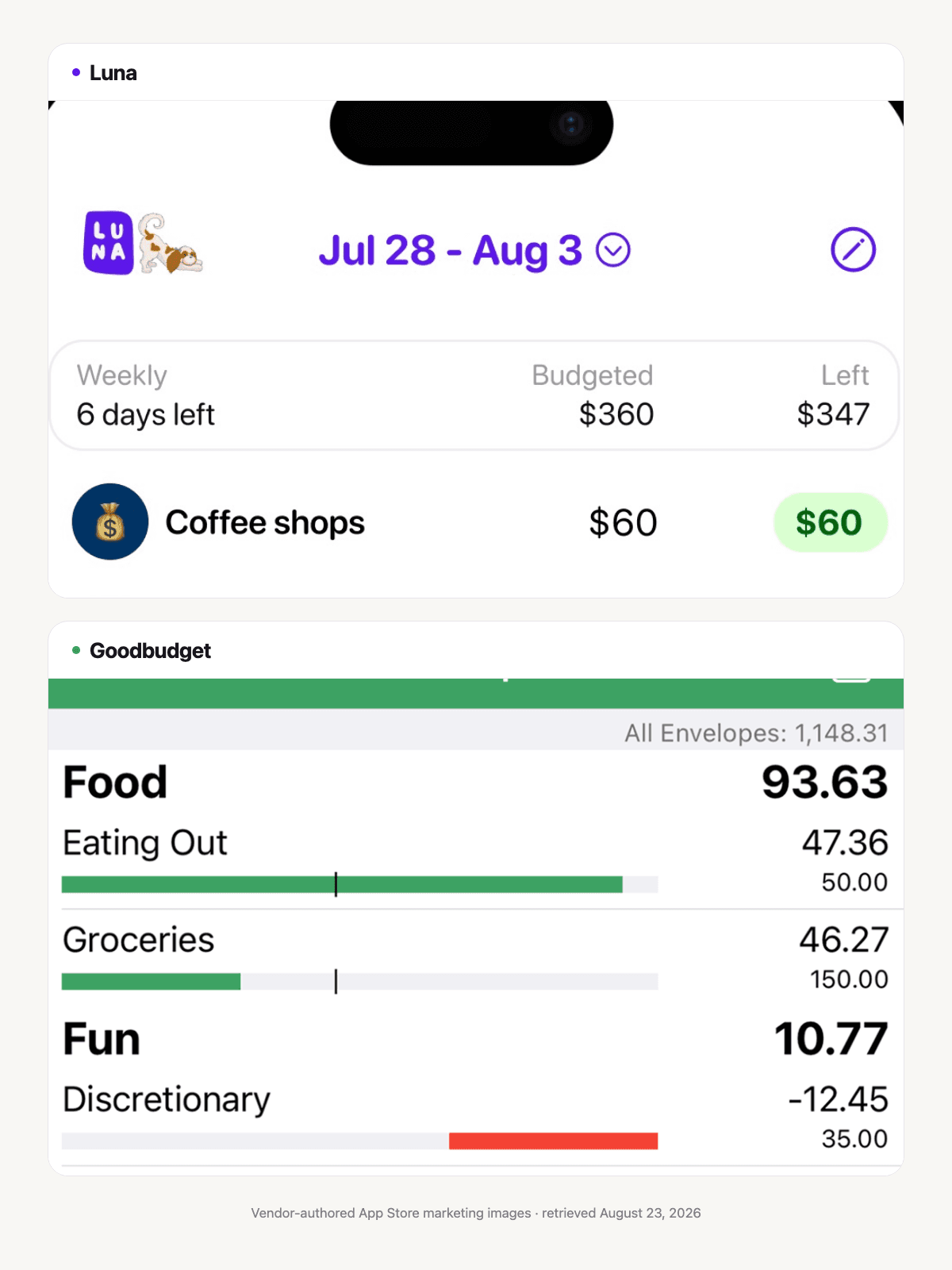
Vendor-authored App Store marketing images, retrieved August 23, 2026. They show visible interface differences only, not a hands-on usability test or proof of pricing, sync, sharing, or outcomes.
The biggest difference is the budgeting model
Goodbudget is built around envelopes. You name an envelope—Groceries, Gas, Restaurants—and fill it with money from income. When you record spending, the amount comes out of that envelope. That is a digital version of putting cash into labeled paper envelopes.
Luna is built around categories and time periods. According to Luna’s budgeting guide, a category can be weekly or monthly, and the home screen shows the budgeted amount, what has been spent, and what remains. The result can feel envelope-like because a category has a limit and a remaining balance. However, Luna’s public guide does not describe native envelopes, an “unallocated money” pool, formal envelope-filling, or envelope-specific rollover rules.
That distinction matters if the method itself is important to you. If you want to move available money between named envelopes and maintain a complete envelope budget, Goodbudget is the purpose-built option. If you mostly want to know whether this week’s dining or grocery spending is on track, Luna’s simpler category model may be enough.
For a deeper explanation of the method, see how digital envelope budgeting works.
Manual entry and bank sync
Luna is intentionally manual. Its account-tracking documentation says it does not automatically pull transactions or balances. You record purchases and maintain account balances yourself. Luna does document recurring transactions, which can reduce the work for predictable bills.
Goodbudget supports manual entry too. Premium members in the United States can also use optional automatic bank sync through Plaid. Goodbudget says users can skip linking accounts and instead enter transactions or import a bank file. Imported transactions still need confirmation and sometimes a corrected envelope. Goodbudget documents those steps in its bank-sync overview and exact confirmation guide.
This creates three practical choices:
Immediate manual awareness: Luna or Goodbudget manual entry can update the budget as soon as you record a purchase.
Manual planning with a later safety net: Goodbudget Premium can import eligible transactions for review.
Broad automation elsewhere: If automatic coverage across many institutions is your first priority, compare dedicated bank-connected products rather than choosing on visual style alone.
Goodbudget says most new synced transactions arrive in one to three days, depending largely on the bank, and pending transactions cannot be assigned until they clear. That timing is specific to Goodbudget’s documented system, not a rule for every connected app. Goodbudget import timing
If you are still deciding which capture method suits you, read manual versus automatic budgeting.
Platforms and shared budgets
Goodbudget has the clear advantage for mixed-device households. Its plan page lists access on the web, Android, and iPhone. The Free plan supports two devices, while Premium supports five. Goodbudget also describes sharing one household budget as a core use case.
Luna’s current public materials focus on iPhone and iOS widgets. They do not document an Android or web app, nor a purpose-built partner-sharing workflow. If one person uses Android, or two people need to enter and review the same budget from different platforms, Goodbudget is the more clearly documented fit.
An individual iPhone user may see that breadth differently. More platforms are useful only when you need them. A smaller, phone-first tool can be easier to return to during the day.
Free tier and paid plans
Goodbudget Free is a real ongoing plan, not just a trial. It includes ten regular envelopes plus ten additional envelopes, one account, two devices, one year of history, and debt tracking. Premium adds unlimited envelopes and accounts, five devices, seven years of history, optional US bank sync, and email support. Goodbudget lists Premium at $10 per month or $80 per year. Goodbudget plans
Luna is paid after a trial. The US App Store listing currently shows monthly, annual, and lifetime purchases at $4.99, $49.99, and $149.99. Luna’s pricing page currently contains both a 30-day headline and a 14-day FAQ, while the US App Store listing says 14 days. Check the purchase screen shown on your device before starting. That inconsistency is a limitation in the published information, not something to quietly smooth over.
Price should follow fit. Goodbudget Free is the easier low-cost starting point. Luna’s lifetime option may appeal to someone who already knows the manual iPhone workflow suits them, but a lifetime purchase is not a reason to accept a method you will not maintain.
A worked example: one person versus a shared household
Imagine a monthly flexible-spending plan with four categories:
Category | Monthly plan |
|---|---|
Groceries | $520 |
Dining out | $240 |
Gas and transit | $180 |
Fun | $120 |
Total | $1,060 |
Scenario A: one iPhone user wants weekly guardrails
Groceries and dining are the categories most likely to run out early. Using annual-equivalent math, $520 per month becomes exactly $120 per week, while $240 per month becomes about $55.38 per week. In Luna, that person could use those weekly targets, then keep Gas and Fun monthly. A simpler $55 Dining Out target would leave $20 per year as a small cushion. Do not divide a monthly amount by four unless you intentionally use thirteen four-week periods or have another plan for the extra days.
This is where Luna’s weekly/monthly mix is useful: the timing of the limit can match the decision.
Scenario B: two people share spending across iPhone and Android
The household wants every dollar of the $1,060 placed into named envelopes, and both people need access. Goodbudget fits the published requirements better. They can fill four envelopes, record purchases from their own devices, and move money between envelopes when plans change. If they pay for Premium in the US, they can choose bank sync as a review aid.
The math is the same. The better tool changes because the operating requirements changed.
Where Luna is the better fit
Luna is worth considering when all of these are mostly true:
You use an iPhone.
You prefer manual transaction entry.
Weekly limits help with flexible spending.
You want a focused budget rather than a full household finance system.
You do not need a permanent free tier.
Luna can also suit someone who found formal envelope setup heavier than the problem they are trying to solve. A few well-chosen categories may be more useful than representing every dollar in the app.
Where Goodbudget is the better fit
Goodbudget is the stronger choice when any of these is essential:
You want a formal digital-envelope workflow.
You need an Android or web app.
You share a budget across a household.
You want an ongoing free option.
You want optional US bank sync while retaining manual and file-import choices.
You need more documented account and history capacity.
Its strongest case is not “more features.” It is that those features solve concrete household and method needs Luna does not currently document.
When neither is the right tool
Choose something else if your main goal is investment tracking, tax planning, business bookkeeping, or a complete net-worth dashboard. A spreadsheet may be better if you want total control over formulas and do not mind maintenance. YNAB may be a better fit if you want a rigorous assign-every-dollar method with a large education library; see the detailed Luna versus YNAB comparison.
And if the thought of maintaining any categories makes you avoid budgeting altogether, begin with a weekly statement review or a one-category spending cap. The useful system is the one you will look at before the next decision.
Frequently asked questions
Is Goodbudget free?
Yes. Goodbudget publishes an ongoing Free plan with limits on envelopes, accounts, devices, and history. Premium expands those limits and adds optional US bank sync and email support.
Does Luna connect to bank accounts?
Luna’s public account-tracking guide says the app does not automatically pull transactions or balances. Its workflow is manual. Read Manual Budgeting App for the tradeoffs.
Can I export my Goodbudget history before switching?
Goodbudget documents an Export CSV link above its web transaction list. That gives you a spreadsheet-readable copy of transaction history. Luna’s public guide does not document importing that CSV, so treat it as an archive and analysis file—not a promised one-click migration.
Can I rely on Goodbudget without internet access?
Goodbudget’s device guide describes the service as available wherever you have internet access and says changes are backed up automatically. It does not make a clear offline-use promise on that page. If offline entry is essential, test the current app on your own device before moving a live household budget.
Sources and limitations
Checked August 23, 2026. Product behavior, prices, and eligibility can change.
Luna: budgeting, account tracking, recurring expenses, and US App Store listing.
Goodbudget: plans and pricing, household sharing, bank-sync overview, transaction confirmation, import timing, CSV export, and device availability.
This comparison relies on public documentation rather than an independent side-by-side product test. Luna’s current public guide does not establish native envelope mechanics, partner sharing, Android/web availability, or automatic bank import. Its published pages conflict on trial length. Goodbudget’s bank sync is described as a Premium feature for US banks; eligibility and institution support can vary.
See plans before you choose
Choose the Luna plan that fits.
Compare monthly, annual, and lifetime options. Confirm the current trial and purchase terms on your device.


