Manual Budgeting App: What It Is, Who It Fits, and How to Start
A practical guide to manual budgeting apps, including the real tradeoffs, a simple setup, and an honest look at when automation may fit better.
Chris Raroque
About 10 min read
Published

You buy a coffee, open your budget, enter the amount, and choose “Coffee.” That tiny pause is the defining feature of a manual budgeting app: you maintain the record yourself instead of waiting for a bank connection to import the purchase.
The short answer
A manual budgeting app is a good fit when you want a simple, deliberate view of spending and you are willing to record purchases consistently. It gives you control over when a transaction appears and how it is categorized, but it can miss anything you forget to enter. If your priority is effortless coverage across several accounts, an automatic or hybrid budgeting system will probably fit better.
I should disclose my perspective up front: I built Luna, a manual budgeting app for iPhone. I believe manual tracking can be useful because it puts the budget close to the moment of spending. But it is not automatically more accurate, more responsible, or better for everyone. This guide is meant to help you choose a workflow, not convince you that one method is morally superior.
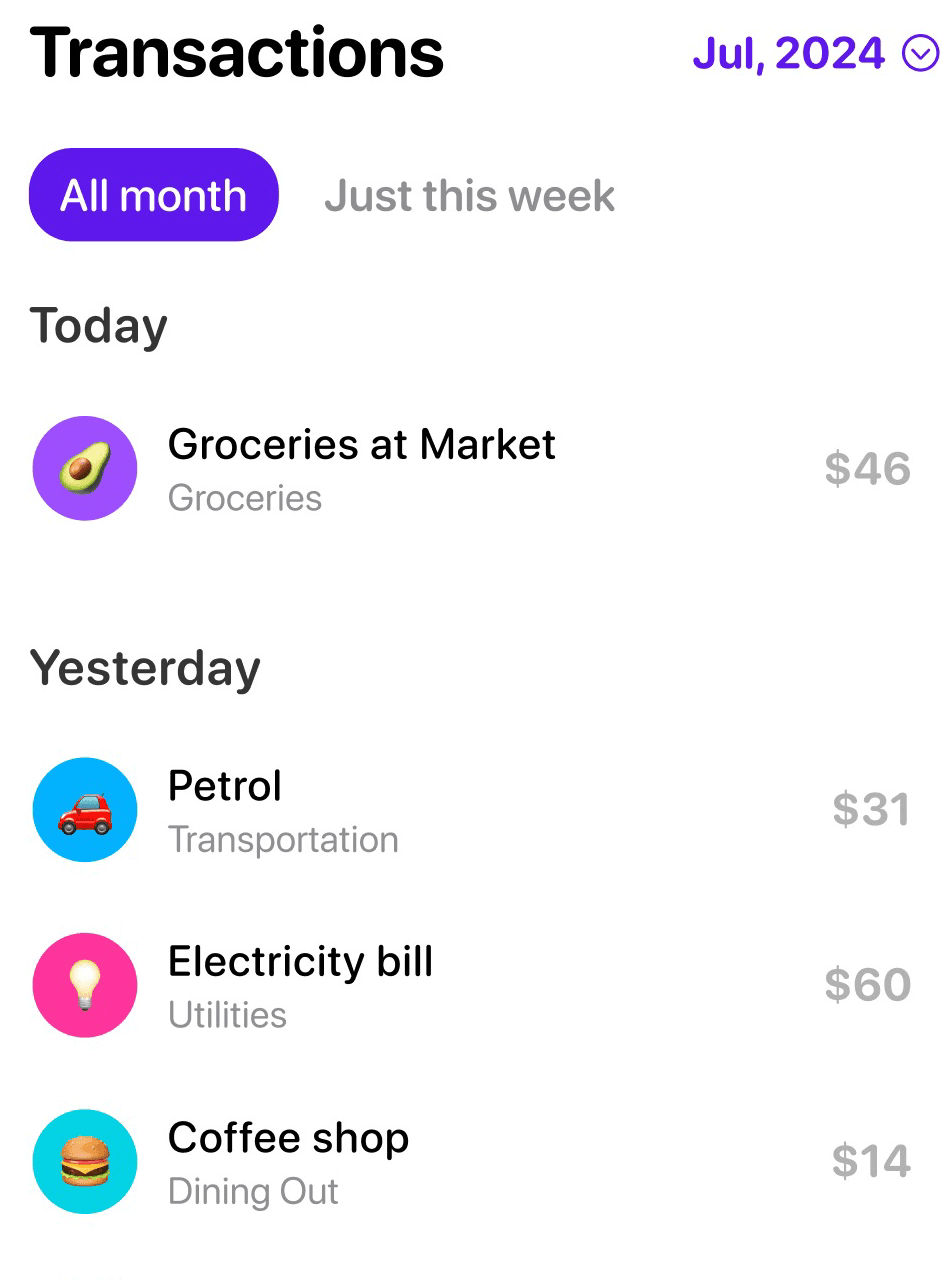
Vendor-authored Luna App Store marketing image, retrieved August 23, 2026. It shows the visible manual transaction list only; the interface and sample data may change.
What “manual budgeting” actually means
Manual budgeting can refer to a few related habits:
You enter purchases one at a time as they happen.
You review receipts or statements later and enter a batch.
You maintain category limits yourself rather than letting an app infer them.
You reconcile the app with your real accounts and correct any differences.
It does not necessarily mean doing every repetitive task by hand. A manual-first app may still support recurring transactions for rent or subscriptions, reminders to log spending, suggested categories, widgets, or account adjustments. Luna, for example, documents recurring transactions, reminders, widgets, and manual balance adjustments when its account record no longer matches real life.
The meaningful distinction is how ordinary transactions get into the budget. Luna’s account-tracking guide says it does not automatically pull transactions or balances. You create and maintain the record.
Manual budgeting is a workflow, not a personality type
People sometimes describe manual budgeters as disciplined and automatic-budget users as passive. Real life is not that neat.
A person can carefully review every imported transaction. Another person can manually log three coffees, forget the electric bill, and never reconcile the total. The capture method does not tell us whether the budget is complete or useful.
What manual entry reliably adds is a decision point: you need to notice a purchase, open the app, record an amount, and choose a category. That may help some people keep spending more visible. A small study involving 170 college students found that an expenditure-tracking exercise increased participants’ awareness of their spending, but it studied a broader intervention in a specific population—not Luna, not manual apps versus bank sync, and not everyone’s long-term behavior. It is better evidence for “tracking can prompt reflection” than for “manual entry makes people spend less.”
The real tradeoffs
Question | Manual budgeting | Automatic bank import |
|---|---|---|
When does a purchase appear? | When you enter it | When the institution and import system deliver it |
Who chooses the category? | You | The app may suggest one, but review can still be needed |
Can it miss a purchase? | Yes, if you forget it | Yes, if an account is disconnected, unsupported, or delayed |
Does it work with cash? | Yes, if you record it | Cash still needs another workflow |
Setup | Usually simple, but ongoing entry is required | Connecting accounts takes setup; ongoing capture is lighter |
Data sharing with an aggregator | Not required for manual capture | Common, though the provider and permissions vary |
Best fit | A focused budget and a repeatable logging habit | Broad coverage with less transaction-entry work |
Automatic import is not instantaneous bookkeeping magic. Imported purchases can begin as pending, change when they clear, or need categorization. Manual budgeting is not perfect control either: it depends on memory and maintenance.
That is why the better question is not “Which is better?” It is “Which failure mode am I more willing to manage?”
Who tends to like a manual budgeting app
A manual workflow may fit if:
You care most about a handful of flexible categories such as dining out, groceries, entertainment, or shopping.
You want to see a category change immediately after spending rather than wait for an import.
You use cash or accounts that are difficult to connect.
You prefer a smaller app over a complete financial dashboard.
You do not want to grant a budgeting service access to bank transaction data.
You are willing to spend a few seconds entering purchases or do a short daily review.
It may be a poor fit if:
You manage many cards and accounts and need a comprehensive ledger.
You routinely forget transactions and do not want to reconcile.
You share a budget with a partner who needs real-time cross-platform access.
You mainly want net-worth, investment, debt, and forecasting tools.
You want software to find subscriptions or transactions you would otherwise overlook.
There is no prize for choosing the method with more work. The right amount of friction is the amount you can sustain while still trusting the result.
A simple manual budget setup
Do not begin with 35 categories and a promise to log perfectly forever. Start with the few decisions you actually want help making.
1. Choose your planning rhythm
Use monthly limits for fixed or infrequent costs and weekly limits for spending that can run away early in the month. Luna supports weekly and monthly categories on the same home screen.
For example:
Rent: monthly
Utilities: monthly
Groceries: weekly
Dining out: weekly
Personal spending: weekly
Car maintenance: monthly or savings category
If you are unsure, start monthly. You can move flexible categories to a weekly rhythm after seeing where timing becomes a problem. The separate guide on weekly versus monthly budgeting goes deeper on that choice.
2. Set limits from real information
Look at recent statements or receipts before choosing targets. A budget built entirely from what you wish you spent can become discouraging immediately.
Suppose the last two months show:
Groceries: about $115 per week
Dining out: about $75 per week
Personal spending: about $45 per week
A first budget might use those amounts, then intentionally reduce only one category. Cutting dining out to $60 while leaving everything else realistic creates a testable plan. Cutting all three in half creates a fantasy.
3. Decide when you will log
Pick one default trigger:
Immediately after paying
When you get back to the car
Through a lock-screen widget
Once after lunch and once before bed
During a five-minute evening receipt review
The trigger matters more than the idealized routine. Luna’s lock-screen widget can open the new-transaction window, which is one way to reduce the number of steps between purchase and entry.
4. Automate only the predictable part
Recurring transactions are useful for rent, a gym membership, or a fixed subscription. They prevent “manual” from becoming “retype the same known bill every month.” Keep variable purchases manual if those are the decisions you want to see.
5. Reconcile without treating it as failure
Compare the app’s tracked account balance with the real balance on a regular schedule. If they differ, look for a missing purchase or use an adjustment. Luna explicitly says adjustments are not a sign that you are doing something wrong.
Worked example: one ordinary week
Maya wants to control dining and personal purchases without turning budgeting into a second job. She keeps rent and utilities as monthly recurring transactions and creates three weekly categories:
Category | Weekly plan |
|---|---|
Groceries | $120 |
Dining out | $60 |
Personal | $40 |
On Monday she enters $7.50 for lunch. Wednesday, she adds a $48 grocery trip. Thursday, she records a $30.50 dinner. Friday, she buys a $28 shirt and records it under Personal.
By Saturday, Dining Out has $22 left. That number does not make the decision for her. It gives her current information before she agrees to brunch. She could go, move money from another category, choose something cheaper, or decide this week is intentionally over budget.
On Sunday, she notices the app is $18 lower than her card statement. She finds a forgotten pharmacy purchase, records it, and reconciles the week. The useful outcome is not perfection. It is a record she trusts enough to consult before the next decision.
How to keep manual budgeting from becoming exhausting
Track the categories that change behavior
If entering every fixed bill adds no value, automate it. If recording dining out helps you make a decision, keep it visible. Your budget can be selective as long as you understand what it does and does not represent.
Keep a “miscellaneous” category
An imperfect real category is better than abandoning the budget because a purchase does not fit your taxonomy. Review miscellaneous spending occasionally and create a new category only when a pattern appears.
Use a restart rule
If you stop for a week, do not make catching up the price of returning. Use a manual balance adjustment for a light reset: reconcile the current balance, record any large transactions that still matter, and restart today. Luna’s separate Fresh Start mode deletes the account and cannot be undone, so it is not the same thing as a routine adjustment.
Review the budget before spending sometimes
Manual entry after a purchase creates a record. Checking a category before a purchase turns that record into a planning tool. You do not need to do this for every expense; use it for categories where the remaining amount could change your choice.
Manual, automatic, or hybrid?
You do not have to commit to one philosophy forever.
Choose manual when you want direct, current category decisions and can maintain the habit.
Choose automatic when complete multi-account coverage matters more than logging each purchase yourself.
Choose hybrid when you want to enter flexible spending immediately and use imports or statements as a backstop.
Choose a spreadsheet or paper planner when you want maximum control without another subscription.
If you are deciding specifically between entry and imports, read Manual vs. Automatic Budgeting. If your main constraint is avoiding account connections, start with Before You Link Your Bank to a Budgeting App.
Frequently asked questions
Do manual budgeting apps connect to your bank?
Some offer manual entry as one option alongside an optional connection. Others, including Luna’s currently documented workflow, do not automatically pull transactions or balances. Check the current product and plan rather than assuming “manual” always means “no connection available.”
How often should I enter transactions?
Use the shortest interval you can sustain. Immediate entry gives the most current category balance; a daily review is often easier. If you wait a week, set aside enough time to compare the result with your statements.
Is manual budgeting more accurate?
Not inherently. It gives you direct control over every entry, but forgotten or mistyped transactions reduce accuracy. Automatic systems can capture more activity but still have delays, connection problems, and category errors. Reconciliation matters in either system.
Can I use a manual budget with credit cards?
Yes. Record the purchase when it happens and keep the app’s account record aligned with the card balance. The exact transfer and payment workflow varies by app; Luna documents credit-card payments as transfers or manual adjustments in its account guide.
Bottom line
A manual budgeting app is useful when the act of maintaining a small, current plan fits the way you make spending decisions. Its advantage is not virtue or guaranteed behavior change. It is control over the moment a purchase enters your budget. Its cost is that you must keep the record alive.
Start with a few categories, automate known bills, choose a reliable logging trigger, and reconcile without shame. If that routine feels clarifying, manual budgeting may fit. If it feels like data entry you will avoid, choose automation or a hybrid and spend your effort on reviewing the plan instead.
Sources and limitations
Product facts were checked on August 23, 2026 against Luna’s welcome guide, budgeting guide, account-tracking guide, recurring-expense guide, reminder guide, widget guide, Fresh Start guide, and App Store listing.
The expenditure-tracking research discussed above is Palmer et al., “Improving Financial Awareness among College Students,” summarized in the ERIC record. It involved a specific student intervention and should not be generalized into a claim that manual budgeting apps cause lower spending.
Features can change. This article does not independently test Luna or another app and does not provide individualized financial advice.
Try Luna on iPhone
Make the next transaction intentional.
Luna is available for iPhone. Start with a focused manual budget and decide whether the habit fits.


