Luna Budgeting App vs. YNAB: Manual Simplicity or a Full Budgeting System?
A current, source-backed comparison of Luna’s focused workflow and YNAB’s broader budgeting system.
Chris Raroque
About 10 min read
Published

Quick answer: Luna Budgeting App is the simpler fit for an iPhone user who wants to enter spending manually, see weekly and monthly category limits together, and avoid adopting a large money-management system. YNAB is the stronger fit when you want a formal allocation method, optional bank and file imports, web and multi-device access, household sharing, deeper targets, and export. Neither is the universal winner; the choice is mostly about how much system you want to maintain.
Disclosure: I built Luna. This comparison is written from Luna’s site, so I have an obvious stake in the outcome. Product facts were checked against the companies’ public documentation on August 23, 2026. I did not run a fresh side-by-side usability test for this draft, and pricing, trials, and features can change before publication.
The shortest useful comparison
If this matters most | Better starting point | Why |
|---|---|---|
A focused manual iPhone routine | Luna | Luna centers manual transaction entry and a smaller set of budgeting, account, recurring-expense, widget, and reporting tools. |
A complete allocation method | YNAB | YNAB teaches a specific method for assigning available money and adjusting the plan as life changes. |
Automatic bank import | YNAB | YNAB offers optional Direct Import in supported regions; Luna’s account tracking is currently manual. |
Web, Android, or broad cross-device access | YNAB | YNAB supports web and mobile use; Luna is currently designed for iPhone. |
A household plan | YNAB | YNAB Together supports sharing one subscription with a group. Verify the current account and privacy model before inviting anyone. |
Weekly and monthly spending categories on one home screen | Luna | Luna documents both category rhythms in the same budget view. |
CSV or TSV plan export | YNAB | YNAB documents web-based export. Luna’s pricing page mentions export, but its help center does not currently document the workflow well enough for this draft to treat it as verified. |
The lowest current listed price | Luna | Luna’s public price is lower, but its trial wording is inconsistent across its own pages and needs correction before publication. |
This table compares documented scope, not budgeting outcomes. More features can be useful, but they also create more setup. A smaller tool can feel clear, but it places more responsibility on the person entering and reviewing transactions.
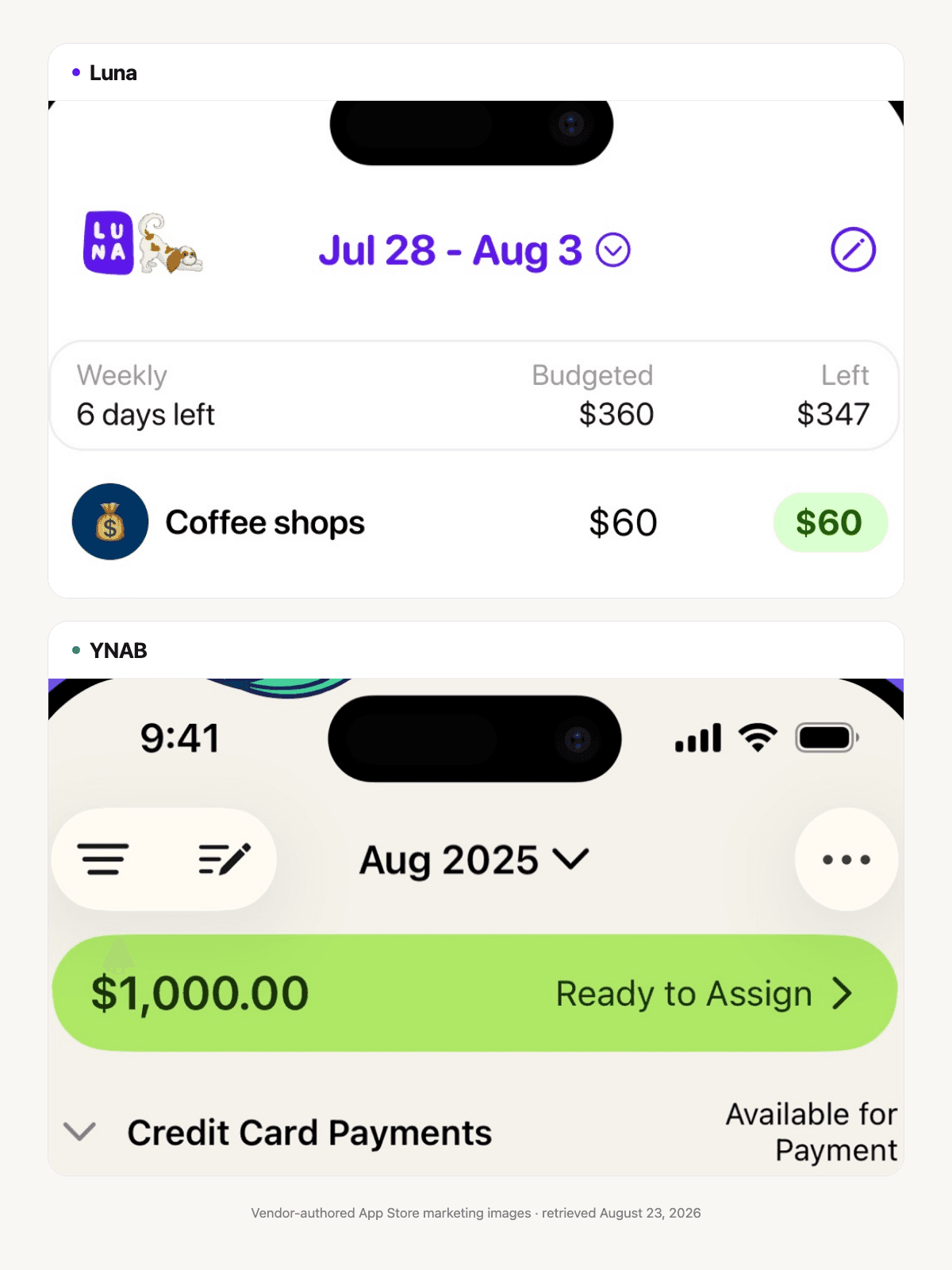
Vendor-authored App Store marketing images, retrieved August 23, 2026. They show visible interface differences only, not a hands-on usability test or proof of pricing, imports, sharing, or outcomes.
The real difference is the job each app is trying to do
Luna is primarily a spending-awareness and budgeting tool. You create categories, set weekly or monthly targets, log transactions, and see what remains. You can also track income, accounts, recurring expenses, and reports, but the interaction stays centered on a relatively small iPhone home view.
YNAB is a broader budgeting system. Its method asks you to work with money you currently have, assign it to priorities, prepare for non-monthly expenses, and change the plan when reality changes. The app then supports that method with accounts, targets, imports, reports, sharing, and a web interface.
That distinction matters more than a checklist. Someone who keeps abandoning complicated finance systems may prefer Luna’s narrower routine. Someone who wants to coordinate bills, savings goals, irregular expenses, debt, and a partner’s plan may find Luna too limited.
What setup feels like
In Luna
A practical first setup can be small:
Create weekly categories for spending that tends to drift, such as dining out, groceries, or personal spending.
Create monthly categories for rent, utilities, subscriptions, and other slower-moving expenses.
Add income or savings categories only if they help your view; Luna lets you keep the interface simpler.
Enter purchases as they happen or during one short daily check-in.
Reconcile the app with real account balances when needed. Luna documents manual adjustments for times when the numbers no longer match.
The advantage is that you can begin without reconstructing your entire financial life. The cost is that missing transactions remain your responsibility.
In YNAB
YNAB asks for more decisions at the beginning. You choose which accounts belong in the plan, assign available money, create categories and targets, and learn how transfers, credit cards, and future expenses work inside the method. You can enter transactions manually, use file import, or connect supported institutions through Direct Import.
That setup is not pointless complexity. It powers a more complete view. But if your real goal is simply, “How much do I have left for restaurants this week?” it may be more system than you want.
Manual entry and bank import
Luna’s account-tracking guide says transactions and balances are not automatically pulled. Manual entry is the core workflow, not a degraded mode.
YNAB supports several capture paths. Its official guide covers adding transactions without Direct Import, and its documentation also describes file-based import. Direct Import is optional where it is available.
Automatic import reduces capture work, but it does not remove review. Transfers, refunds, tips, cash, pending amounts, and unfamiliar merchant names can still need attention. Manual entry gives you immediate control over the record, but it can be incomplete when you are busy. A hybrid workflow—quick manual entry followed by import reconciliation—is legitimate if the tool supports it.
If your main concern is connecting an account, start with Manual Budgeting App and the checklist in What to Ask Before You Connect Your Bank.
Weekly categories versus a full allocation plan
A central Luna planning choice is that weekly and monthly categories can appear together. A $120 monthly restaurant target can become a weekly target when shorter feedback is easier to use. Rent can remain monthly. This is useful for someone who thinks about fixed obligations and flexible spending on different clocks.
YNAB is not simply a monthly category tracker. Its method is about allocating money that is available and moving it as priorities change. Categories can hold money for future expenses, and targets can help plan recurring or dated needs. Read YNAB’s current method overview before deciding whether that way of thinking feels clarifying or burdensome.
If you want to adapt an every-dollar plan inside Luna, read Zero-Based Budgeting on iPhone. The important limitation is that Luna’s documentation does not show a native “ready to assign” or “unassigned equals zero” workflow. It can support parts of the practice through categories; it should not be presented as the same system.
A worked example: the restaurant budget that keeps disappearing
Imagine Maya has $240 per month for restaurants and coffee. The problem is not the total; it is that she often spends most of it in the first two weekends.
In Luna, she could use an average weekly equivalent of about $55.38 ($240 × 12 ÷ 52) and log purchases as they happen. Or she could choose a simpler $55 target and keep the remaining $20 per year as a small buffer. The shorter limit answers a concrete question each Friday: what is left for this week? If one week is unusual, she decides how to handle the next week rather than assuming the software will rebalance everything.
In YNAB, Maya could assign $240 to Dining Out, use a target if helpful, and move money between categories when her priorities change. If she connects an account, imported transactions can be matched and categorized after they arrive. The system can show how the restaurant decision affects the rest of the assigned plan.
The same person might prefer either approach. Luna keeps the decision close to one spending category. YNAB makes the tradeoff visible across the larger budget.
Devices, sharing, and portability
YNAB supports web and mobile access and documents YNAB Together, which currently allows one subscription to include a group of up to six people. Sharing financial plans deserves a privacy conversation of its own: confirm who can see which plan, who owns the subscription, and what happens when someone leaves.
Luna is currently an iPhone app. This can be a feature if you want one focused personal routine; it is a hard limitation if you need Android, a desktop browser, or collaborative household budgeting. Luna’s current sharing behavior needs written product verification before this comparison is published.
YNAB also documents CSV and TSV plan export from the web app. Luna’s pricing page says users can export data, but because the current help center does not explain the format and steps, treat that as a claim requiring review rather than a settled comparison point.
Price and trial: recheck before choosing
As of the check date, YNAB lists $109 per year or $14.99 per month and a 34-day direct trial. App-store billing and promotional terms can differ.
Luna’s pricing page lists $4.99 per month and $149.99 lifetime, while the App Store also lists annual availability. However, Luna’s own site currently conflicts about whether the automatic trial is 14 or 30 days. That inconsistency must be fixed before publication; do not choose based on an unverified trial length.
Price is only useful beside commitment. A cheaper tool that you never update is expensive in attention. A broader subscription that prevents repeated rebuilds may be worthwhile. The reverse can also be true.
Choose Luna if…
you want a personal, iPhone-centered manual budgeting habit;
weekly spending limits are more useful to you than one monthly number;
you prefer a smaller surface and are willing to enter transactions;
you do not need automatic bank import, Android, web-first work, or documented household sharing.
Choose YNAB if…
you want to adopt a complete allocation method;
optional bank import and file import matter;
you need web, Android, or a shared household plan;
targets, broader account workflows, and documented export justify more setup and a higher subscription.
Who neither app is for
Neither is a good default if detailed category budgeting makes you avoid your finances entirely. A simple bank alert, a spreadsheet reviewed weekly, a cash-flow calendar, or an “automate essentials and savings, then monitor the remainder” approach may be more sustainable.
Neither app replaces professional help for debt distress, tax decisions, benefits eligibility, investing, or financial emergencies.
Frequently asked questions
Can YNAB be used without linking a bank?
Yes. YNAB documents manual entry and file-based import in addition to optional Direct Import. Verify availability for your institution and region.
Is Luna a YNAB replacement?
Only for a narrower job. Luna can replace YNAB for someone who mainly wants manual spending categories and account awareness on iPhone. It does not currently document the same allocation workflow, platform breadth, sharing, imports, targets, or export depth.
Is Luna a zero-based budgeting app?
Luna can support user-created categories for spending, income, and savings, but its public documentation does not show a native “assign every available dollar until zero remains” system. Treat it as an adaptation, not an equivalent implementation.
Which app is easier?
Luna has less surface area. That often means less setup, but the manual routine can still be demanding. YNAB takes more learning, then offers more automation and structure. “Easier” depends on whether entry effort or system complexity is the bigger burden for you.
Related guides
Sources and limitations
Product facts were checked August 23, 2026 against Luna’s budgeting, account tracking, recurring expenses, widgets, reports, pricing, and US App Store listing; YNAB’s pricing, method, manual entry, file import, Direct Import, export, and sharing documentation. This draft compares documented features, not long-term outcomes or a fresh controlled test. Luna claims about trial length, export, and sharing remain open for product review.
See plans before you choose
Choose the Luna plan that fits.
Compare monthly, annual, and lifetime options. Confirm the current trial and purchase terms on your device.


