Free Weekly Spending Planner: Printable Template and Worked Example
A simple weekly planning template for turning a monthly budget into practical spending limits.
Chris Raroque
About 10 min read
Published

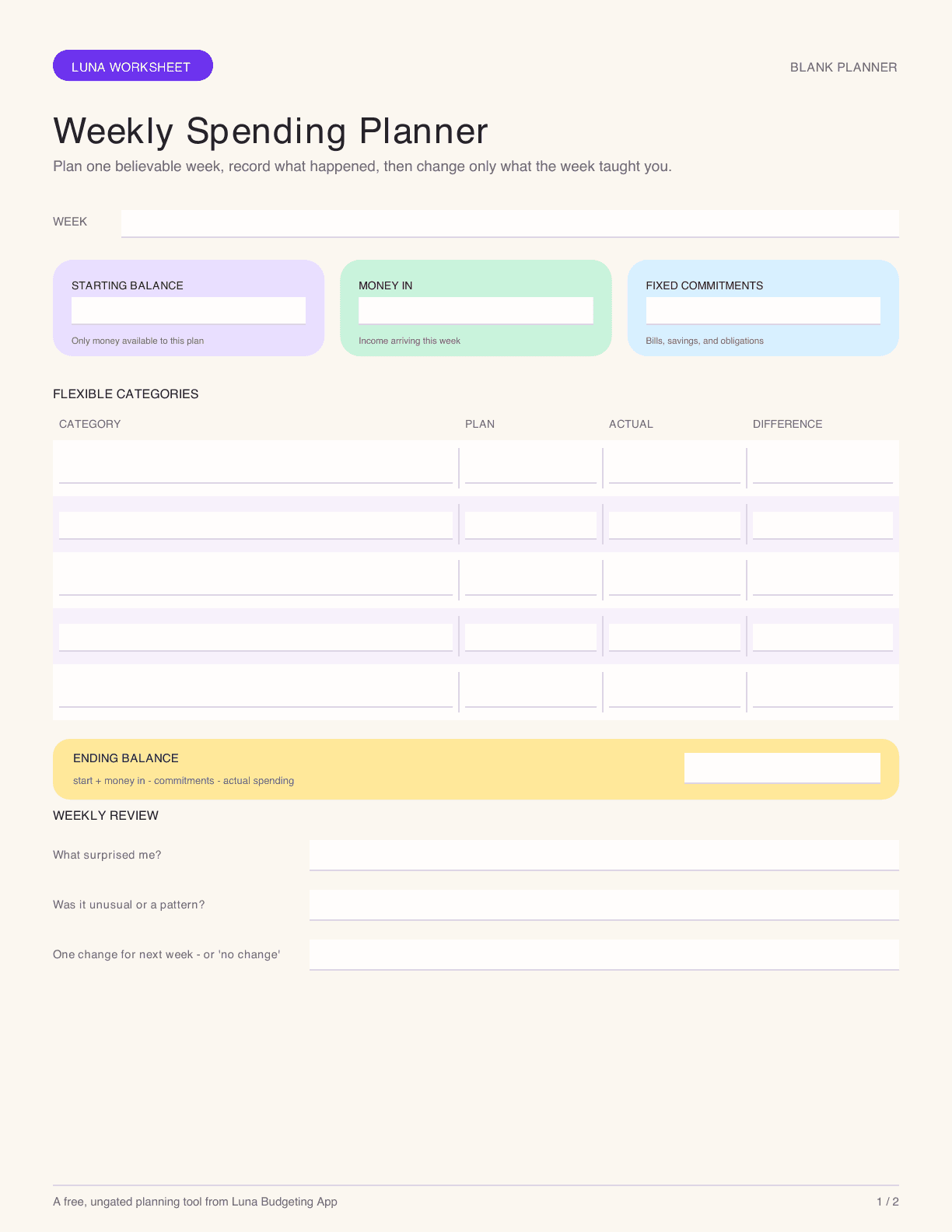
Quick answer: A useful weekly spending planner gives one week of flexible money a clear job before it disappears. Start with money actually available for the week, subtract fixed commitments and planned savings, set limits for flexible categories, record what you spend, and carry the confirmed ending balance into the next week after protecting upcoming obligations. Download the blank planner, then use the filled example below before making your own.
Disclosure: I built Luna, which is one optional way to use the workflow below. The planner is designed to stand on its own and does not require Luna or another app.
Download the free weekly spending planner: US Letter PDF · A4 PDF
Both PDFs include a blank planner and a filled example. No email address is required.
What this planner is for
Monthly budgets are good at showing the big picture. They can be less useful on a Wednesday afternoon when you need to know whether takeout fits before Friday’s grocery run.
This planner turns one week into a small decision window. It is best for flexible spending—groceries, eating out, fuel, personal spending, and household extras—plus any bills or income that actually arrive during the week. It is not a replacement for an account ledger, debt plan, emergency-fund plan, or professional financial advice.
The structure follows a simple cash-flow idea: begin with what is available, add money that arrives, subtract the week’s commitments and spending, and reconcile the ending amount before deciding what can carry forward. The Consumer Financial Protection Bureau’s cash-flow budget tool uses the same week-to-week balance logic.
The six boxes on the weekly sheet
1. Week and starting balance
Write the dates, then enter the amount available for this plan at the beginning of the week. Decide what the number means before you use it.
It might be:
the checking balance after protected bills are set aside;
a separate weekly-spending account;
cash plus debit money available for flexible categories;
last week’s ending balance.
Do not use the full bank balance if part of it already belongs to rent, taxes, a credit-card payment, or another obligation.
2. Money arriving this week
List paychecks, reimbursements, benefits, transfers into the spending account, or other money you reasonably expect to be available. Mark uncertain income as uncertain rather than planning as if it has already arrived.
3. Fixed commitments
Add bills and obligations due this week: rent, insurance, childcare, subscriptions, a minimum debt payment, or a planned transfer to savings. If a monthly bill was already protected outside this weekly balance, do not subtract it twice.
4. Flexible category limits
Choose a short list. Five categories are usually enough for one sheet:
groceries;
dining and coffee;
transportation;
household or family;
personal or fun.
The point is not to predict every purchase. It is to put a believable boundary around the categories you can still influence.
5. Actual spending
Record purchases during the week or total them during a consistent daily check-in. Use one line for awkward items—refunds, shared purchases, cash, transfers—rather than forcing them into a category that hides what happened.
6. Review and carry-forward
Calculate:
starting balance + money in − commitments − actual flexible spending = ending balance
Then answer three questions:
What was different from the plan?
Was the category unrealistic, or was this an unusual week?
What should change next week: the amount, the category, the timing, or nothing?
A filled example
Jordan starts Monday with $610 available for the week. A $350 freelance payment is expected Wednesday. Rent is already protected in another account, so it does not appear here.
Weekly plan | Planned | Actual |
|---|---|---|
Starting balance | $610 | $610 |
Money arriving | $350 | $350 |
Childcare | $220 | $220 |
Savings transfer | $100 | $100 |
Groceries | $150 | $164 |
Dining and coffee | $70 | $54 |
Transportation | $60 | $48 |
Household | $40 | $71 |
Personal | $35 | $20 |
Ending balance | $285 | $283 |
Jordan ended close to plan, but the category details matter. Groceries were $14 over and household spending was $31 over because a smoke detector needed replacing. Dining, transportation, and personal spending were $47 under in total.
The useful review is not “I failed two categories.” It is:
keep the grocery amount for another week before changing it;
classify the smoke detector as an irregular home expense, not evidence that the weekly household limit is always too low;
carry $283 forward only after confirming which part still belongs to future bills.
How to set a weekly amount from a monthly budget
For a true average weekly equivalent, use:
monthly amount × 12 ÷ 52
A $520 monthly grocery amount becomes $120 per average week:
$520 × 12 ÷ 52 = $120
Simply dividing by four would create $130 per week. Across 52 weeks, that becomes $6,760—$520 more than the original annual plan. Dividing by four is valid only if you intentionally run thirteen separate four-week budget periods or have a specific plan for the extra days.
Some categories should not be converted. Keep rent and many subscriptions monthly. Use the weekly average for flexible categories where a shorter feedback loop is helpful.
For more on the tradeoff, read Weekly vs. Monthly Budgeting.
Planning around payday
A calendar week and a pay period are not always the same.
If you are paid every two weeks, create a two-week cash-flow plan first, then give each week its own flexible limits. If income is irregular, begin with money already available and treat future invoices as unconfirmed until they arrive. If several bills cluster before payday, the problem may be timing rather than the monthly total.
The CFPB describes a cash-flow budget as a way to track the timing of income and expenses so you can see whether each week has enough. That is different from converting every expense into a weekly average.
Use it on paper, in a spreadsheet, or with Luna
The planner works without an app. Keep the sheet visible, write purchases on the back, and total them during a five-minute evening check-in.
In a spreadsheet, duplicate one tab per week. Protect formula cells, use plain currency formatting, and keep the category list short enough to review on a phone.
In Luna, create weekly categories for the flexible lines you want to see frequently. Luna’s budgeting guide says weekly and monthly categories can appear together. A lock-screen widget can open the transaction flow quickly, according to Luna’s widget guide. Luna is optional; the worksheet should remain complete on its own.
If manual logging is the sticking point, compare the capture tradeoffs in Manual vs. Automatic Budgeting.
A five-minute weekly review
At the end of the week:
Reconcile the sheet with receipts and account activity.
Mark refunds, transfers, and shared purchases separately.
Calculate the ending balance.
Circle one variance that teaches you something.
Write one change for next week—or explicitly write “no change.”
Copy the confirmed ending balance into the next sheet.
Do not redesign the entire budget because one category had an unusual week. Look for a repeated pattern over several weeks.
Common mistakes
Treating the full checking balance as spendable
Protect bills, debt payments, taxes, and savings commitments before declaring the weekly amount.
Counting a transfer as spending twice
A transfer to savings can appear as a commitment in the cash-flow plan. Do not also count the same movement as flexible spending.
Hiding irregular expenses in “miscellaneous” forever
One miscellaneous line is useful. Repeated car, medical, gift, school, or home costs deserve their own monthly or sinking-fund plan.
Making twelve tiny categories
The sheet is a decision aid, not a complete accounting system. Combine categories that lead to the same decision.
Punishing next week for every overage
First decide whether the overage reflects a real tradeoff, a one-time need, a timing mismatch, or a planning error. Then adjust intentionally.
Who this planner is not for
This one-page tool is not enough when income cannot cover essential expenses, debt payments are in distress, benefits or legal obligations are at risk, or someone else controls access to the household’s money. A nonprofit credit counselor, benefits specialist, financial counselor, attorney, or other qualified support may be more appropriate depending on the situation.
It is also not ideal for someone who wants every transaction imported automatically. Use a connected budget tool or a hybrid workflow if manual capture repeatedly fails.
Frequently asked questions
Should a weekly budget start on Monday or payday?
Use the boundary that matches decisions. Monday works for a stable routine. Payday works better when available cash changes meaningfully on that date. A two-week pay cycle can still contain two weekly flexible-spending sections.
What happens in a five-week month?
If you used the annual conversion formula, the fifth week is already part of the average. If you divided a monthly amount by four, you need a separate rule for extra days. Do not pretend they are free.
Should unused money roll over?
It can. Confirm that the money is not needed for a protected bill, then choose whether it stays in the category, moves to a goal, or reduces next week’s planned amount. Write the rule on the sheet so rollover is a decision, not an accident.
How often should I record spending?
As often as needed to keep the numbers decision-ready. That may be at purchase time, once each evening, or during a daily import review. Waiting until the week ends removes most of the planner’s in-the-moment value.
Related guides
Sources and limitations
Checked August 23, 2026. The week-to-week balance method is informed by the CFPB’s Creating a cash flow budget and weekly spending tracker, plus the federal Consumer.gov budget guidance. Luna workflow details come from its budgeting and widget documentation. The worksheet is a Luna editorial tool, not a tested financial intervention, and the downloadable files require accessibility and calculation QA before publication.
Explore Luna
See how Luna keeps budgeting focused.
Explore Luna’s manual-first budgeting approach, features, and latest iPhone availability.


